Labels

5 Best Websites to Sell Your Old Gadgets

Nothing Last forever especially electronics. Gadgets are playing an important role in everyone’s life but with technology getting better and more advanced, gadget are too are getting updated with new features. We desire for the most updated gadgets to make our life easier.

How To Add Google Plus Followers Gadget To Blogger!

One of the best perks of using Google is, it has products that seamlessly integrate with each other to provide an easy and comprehensive interface to users. For example, Google Drive can be used to attach files with emails quickly. You can +1 posts outside Google+, and share search results on Google Plus. You can even auto-publish your Blogger blog feed to your G+ profile. And that is by no means the end of it. In fact, Google just announced a brand new feature, the Google Plus Followers gadget for blogger blogs! This new Google Plus followers' gadget for blogspot blogs will provide another layer of integration between your Google Plus profile and your Blogger/Blogspot blog.

Featured 3

Curabitur et lectus vitae purus tincidunt laoreet sit amet ac ipsum. Proin tincidunt mattis nisi a scelerisque. Aliquam placerat dapibus eros non ullamcorper. Integer interdum ullamcorper venenatis. Pellentesque habitant morbi tristique senectus et netus et malesuada fames ac turpis egestas.

Featured 4

Curabitur et lectus vitae purus tincidunt laoreet sit amet ac ipsum. Proin tincidunt mattis nisi a scelerisque. Aliquam placerat dapibus eros non ullamcorper. Integer interdum ullamcorper venenatis. Pellentesque habitant morbi tristique senectus et netus et malesuada fames ac turpis egestas.

Featured 5

Curabitur et lectus vitae purus tincidunt laoreet sit amet ac ipsum. Proin tincidunt mattis nisi a scelerisque. Aliquam placerat dapibus eros non ullamcorper. Integer interdum ullamcorper venenatis. Pellentesque habitant morbi tristique senectus et netus et malesuada fames ac turpis egestas.

Showing posts with label internet tunneling. Show all posts

Tuesday, 4 December 2012

How I Create Customized Email Addresses


If you want your business to look more genuine when customers or clients contact you via email, you should consider creating a custom email address ID for your business. A customized email account like info@yoursite.com looks a bit more professional than yourname@yahoo.com. I use custom email addresses for my online businesses and have decided to share with you, how to set up such email IDs for your own business.


How To Get Started

You will need a web hosting account for you to be able to create a customized email address, though you do not need to design a website before you can use your customized email ID. If you have a web hosting account, you will be able to access your cPanel, where you will set up your custom email account.

How Do I Get A Web Hosting Account?

There are load of web hosting companies out there but you can try Web4Africa or HostGator. If you are a Nigerian, you can try Web4Africa because the website allows you to pay for web hosting with Naira and even with Liberty Reserve etc.

All you need to do is to register on the sites and order for one of their hosting plans. Once your account has been activated, you will receive the login details to your cPanel in the email address you used when registering on the Web Hosting Websites.

So, How Do I Create E-mail Accounts From My Hosting Account's Control Panel (cPanel)

==> Log into your cPanel via www.yoursite.com/cpanel

==> Once at the main page, click on the "Email Accounts" icon as seen in the picture below


==> Fill the fields accordingly.


  • Type the name of the account eg info, contact, admin, yourname etc.
  •  Enter the password you want to use and the disk space you would like to assign to the mailbox. You can assign an unlimited disk space for the email account. 

==> Click on the "Create Account" button to create the mailbox.

==> You will be taken to a confirmation page. Click on "Yes" to create the customized mailbox.

That's all.

So, How Do I Check I Check Access and Send Mails With My Customized Email Address?

==> Go to www.yoursite.com/webmail

==> Enter your customized email ID in the "email Address" field and enter your password in the "password" field.


==> Click the "Log in" button.

==> Click any of the email providers: SquirrelMail, Horde, RoundCube

==> You will see your inbox and right from there, you will also see the "compose" tab for sending email messages.

That's all.

Go create your own custom emails and let me know via comments, if you face any problem.

Get Your Web hosting accounts at Web4Africa or HostGator and do not waste your time looking for websites where you can create free customized emails.

Thursday, 29 November 2012

ETISALAT PC CHEAT


TUNNELGURU HHT $ VPN NOW WORKING ON ETISALAT WITH 0.00k


DOWNLOAD http://allsoftware.com.ng/TGv1.6.0.2_WIN_32Bit.zip for people using 32bit

DOWNLOAD http://allsoftware.com.ng/TGv1.6.0.2_WIN_64Bit.zip for people using 64bit

EXTRACT AND CONFIGURE LIKE THIS


Web Host :     mobile.etisalat.com   

Web Port : 80#443

Enter username and password here ( get it at http://tunnelguru.com/registration.php )

Proxy URL :    http://etisalat.com/

Proxy Host : 83.170.84.227 or 77.92.68.143 or 93.114.43.209 or 77.92.68.143 or
 93.114.44.130

Port:                80#443

Uncheck  SSL, Buffered

Select : INTERNET-3-G

Start Proxy.


configure browser to 127.0.0.1 Port  6051  ( fast )  SSL: 6052 and 6055 (6055 faster)

OR IF YOU WANT TO USE PROXIFIER THEN CONFIGURE PROXIFIER WITH
    6052 ( slow ) , 6055 ( fast ) 

CONFIGURE YOUR MODEM APN TO etisalat

FOR TORRENT DOWNLOAD PLS USE 93.114.44.130 OR
93.114.43.209 FOR PROXY HOST (if normal is used with torrent client, account will be suspended)

CONNECT WITH 0.00KOBO

DOWNLOAD SPEED IS UPTO 980kb/s


CONTACT ME  ON 08137843366 OR polisezor 07030737188  or MD§K 08030953171 OR VIA PM IF YOU NEED PREMIUM INSTANT ACCOUNT

ALL THOSE THAT HAVE PREMIUM TUNNELGURU ACCOUNT VIA MULTILINKS OR MTN CAN ALSO USE THAT SAME USERNAME AND PASSWORD INSTEAD OF BUYING NEW ONE

THOSE PEOPLE THAT HAVE WARN ME NOT TO POST IT , I AM SORRY TO DISAPPOINT YOU AGAIN

ONE LOVE


THIS IS HOW TO USE PROXIFIER WITH ETISALAT

DOWNLOAD PROXIFIER FROM DOWNLOAD SECTION AND USE THIS SCREENSHOT

This image has been resized. Click this bar to view the full image. The original image is sized 615x296.

This image has been resized. Click this bar to view the full image. The original image is sized 615x282.

This image has been resized. Click this bar to view the full image. The original image is sized 615x333.


THE ONLY PERSON NOT ALLOWED TO MAKE A SINGLE POST IN THIS THREAD IS CAST . PLS KINDLY STAY AWAY BECAUSE I WILL NOT ALLOW POLITICS IN THIS THREAD .THANKS AS YOU HONESTLY COMPLY


PAY 1,000

Bank Name: GT BANK PLC
Account Name: BABALOLA OLASEHINDE ( MAINGATE )
Account Number: 0019406809


Gt Bank
Account Name: Moses Ubogun (polisezor)
Account No:  0033584363


BANK: Eco Bank
ACCNT NAME: Kninmi musa (MD§K™)
ACCNT NO: 0053471544


 TUNNELGURU VPN NOW WORKING ETISALAT WITHOUT BIS

To Run Etisalat  VPN , at First
1) Start HTTP(s) Tunnel with normal Settings.
2) switch to vpn TAB PROXY HOST 109.163.227.172
3) tick use proxy --- your modem ip:6055
6) protocol: TCP

SEE SCREENSHOT SETTINGS


* 1.jpg (47.94 kB, 539x330 - viewed 386 times.)

* 2.jpg (44.87 kB, 532x309 - viewed 316 times.)

* 3.jpg (40.69 kB, 521x310 - viewed 303 times.)

* http side.jpg (70.48 kB, 765x768 - viewed 325 times.)

* vpn side.jpg (60.27 kB, 765x768 - viewed 356 times.)

Temporarily Deactivate or Permanently Delete Your Facebook Account


So, I decided to get off Facebook for a week or two: no messages, no notifications. I wanted to get away from the endless photo tags, group notifications that never seem to stop and many other things I don’t seem to like about the place. I could simply decide not to log in but the pile of notifications and private messages that would be waiting after those few days would be rather too much. I thought the best thing to do was to deactivate my account for a while. I checked the settings and found out I actually have two options:

1. Permanently delete the account

2. Temporarily deactivate it

I prefer the second option because I would still be needing the account, just wanted to get off Facebook for a while. I may want to convert it from a personal profile to page later but before I deactivated the account, I made sure I transferred admin roles of my fan pages to another account. Also, I made sure I edited admin roles for my Facebook apps and added a new admin using my private Facebook account (for family and real friends only) so as not to break anything.

So, with that in place, I did what I had to do.
 
How to permanently delete your Facebook account

Now, if you still intend to use your Facebook account later in the future, you should use the second option which I’m going to explain afterwards. Using this method deletes your Facebook account: photos, videos, updates, notes… everything you’ve ever shared on Facebook (I really don’t know if Facebook actually deletes your personal info from their database anyway).

- Go to this page
- Hit the Delete My Account button
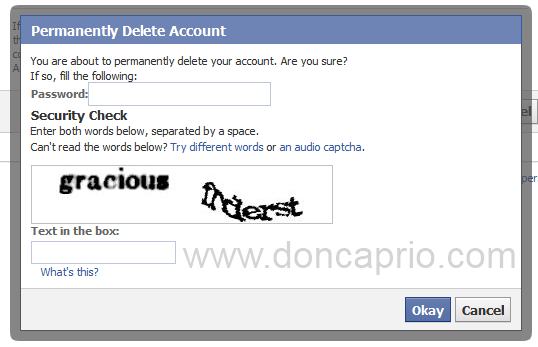
how to delete your facebook account
- Enter your password and fill in the captcha.
You account should now be permanently deleted within 14 days. If you change your mind, you can log in to Facebook before 14 days but if you don’t, your account will be completely deleted and this is not reversible.

How to Temporarily Deactivate your Facebook Account

This is the option I went for cuz it’s safer and sounded more like what I needed. You can always log back in whenever you need to use the account again but while it’s deactivated, your friends can’t interact with you; it’s like taking a break from FB. :)
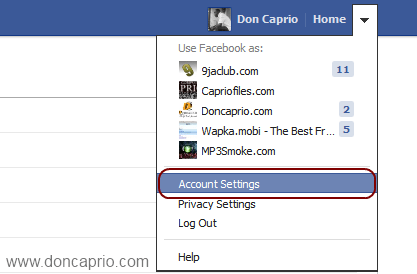
- Go to your Account Settings from the top-right menu
how to deactivate your facebook account
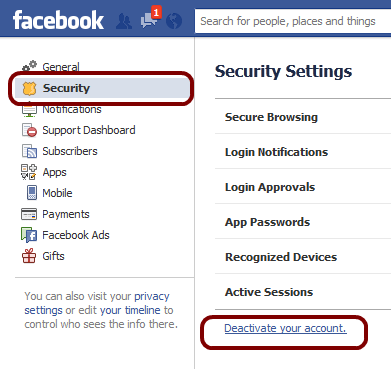
- Click on Security, then “Deactivate your account” as shown below:
how to deactivate your facebook account
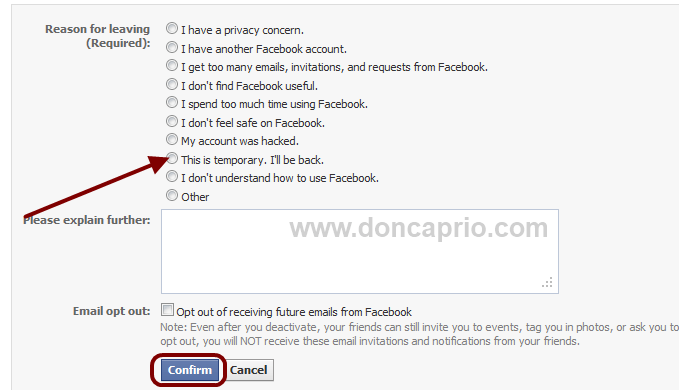
- On the next page, select your reason for deactivating your account and hit the “Confirm” button.
deactivate facebook temporarily
- Enter you password, fill the captcha verification and that’s it. Your account will be deactivated but you can always activate it back anytime you want by simply logging in to Facebook with your normal log in details.